Posts

Showing posts with the label Model Driven App

Decode & Fix : Shared App host initialization has timed out in Microsoft Power Apps

Image
  Issue : While working with apps in the Microsoft Power Platform, we encountered a critical issue where the application failed to load properly. This error appeared intermittently, especially when using custom pages and embedded components. Shared App host initialization has timed out Error Log :  Shared App host initialization has timed out UciError: Shared App host initialization has timed out at s (https://content.powerapps.com/resource/uci-infra-web/scripts/app.4e71963626213ae9901b5ff59d931193.js:38:222131) at Object.execute (https://content.powerapps.com/resource/uci-infra-web/scripts/mds.ca217cfe2bc4dbe9b337ff1da6ed7c28.js:4:9805) at https://content.powerapps.com/resource/uci-infra-web/scripts/app.4e71963626213ae9901b5ff59d931193.js:14:669926 at new Promise (<anonymous>) at w._executeAsyncAction (https://content.powerapps.com/resource/uci-infra-web/scripts/app.4e71963626213ae9901b5ff59d931193.js:14:669627) at w._executeAsync (https://content.powerapps.com/resour...

Beyond Plugins: Modernizing Server-Side Logic in Microsoft Dataverse

Image
Plugins in Dataverse play a vital role in extending the platform’s server-side capabilities by allowing developers to implement custom business logic that executes automatically during data operations such as create, update, or delete. They provide precise control within the Dataverse transaction pipeline, ensuring real-time validation, enforcement of business rules, and seamless integration with system events. However, as business requirements evolve toward cloud scalability, complex integrations, and AI-driven automation, relying solely on plugins can introduce performance, maintainability, and scalability challenges. Plugins have execution time limits, limited debugging visibility, and restrictions when interacting with external systems. Therefore, exploring modern alternatives like Azure Functions, Power Automate, or Webhooks helps offload heavy processing, simplify integrations, and improve observability—while maintaining a flexible, secure, and cloud-native architecture that co...

Understanding the Primary Entity in the Plugin Registration Tool: A Comprehensive Guide

Image
In Microsoft Dynamics 365 and Dataverse, the Primary Entity in the Plugin Registration Tool defines the main table (entity) that the plugin targets and determines when it will execute in response to a specific system event , known as a message . Each plugin step must specify a message such as Create, Update, Delete, or Retrieve, and the primary entity identifies which record type that message applies to—such as account, contact, or incident. For instance, if a plugin is registered with the message “Update” and the primary entity “account,” it will trigger whenever an Account record is updated. The primary entity provides the context for the plugin execution, allowing developers to access the target record and perform business logic accordingly. In some cases, such as with the Associate or Disassociate messages, the primary entity may be left blank since the operation involves a relationship between multiple entities. Understanding the role of the primary entity is crucial for correct...

Embedding Canvas Apps into Model-Driven Forms for a Unified Experience

Image
In Microsoft Power Apps, there are two main application types—canvas apps and model-driven apps—each serving unique purposes. While model-driven apps are tightly coupled with Microsoft Dataverse as their data source, canvas apps offer flexibility with 400+ data sources through built-in or custom connectors. Canvas apps are highly customizable, allowing you to design user interfaces from scratch for mobile or tablet devices. You can drag and drop components, apply formulas for logic, and connect to multiple data sources. Model-driven apps, on the other hand, are structured, data-driven, and ideal for business process–focused solutions. But what if you want the rich visuals and flexibility of a canvas app inside a structured model-driven form? That’s where embedding a canvas app comes in. This integration lets you enhance model-driven forms with custom visualizations, external data sources, and advanced interactivity. Embedding via the Classic Experience 1. Open the main form in your mod...

Canvas App Error: “Row Size Exceeded” – Causes, Fixes, and Best Practices

Image
When building Canvas Apps with Dataverse, you might see this error:  The total size of the columns used in the database command exceeded the database limit.  Cannot create a row of size 8087 which is greater than the allowable maximum row size of 8050. If this caught you off guard, don’t worry. This error is not about your Power Fx formula—it’s a Dataverse + SQL Server limitation. Why This Happens Dataverse runs on top of Azure SQL and follows its row size limit (\~8 KB). Here’s why you might hit this error: 1. Too Many Columns Selected  Canvas Apps often load all columns by default, including: Text and memo fields  Lookup and choice fields  Images and files  Calculated or rollup fields 2. Temporary SQL Row Exceeds 8 KB Behind the scenes, Dataverse queries try to build a temporary row. If the sum of all columns exceeds 8,060 bytes, SQL blocks the operation.  How to Fix the Row Size Issue 1. Only Select Required Columns Use `ShowColumns()` to reduce row...

Demystifying Focused View in Dynamics 365: When and Why to Use It

Image
Focused view lets you see and work with all important details — like your accounts, contacts, leads, opportunities , and their activities — all in one place. You don’t have to keep jumping between different pages, which helps you stay on track, save time, and work more easily. Now, focused view works for everything, even for custom records. But you’ll need your admin to turn it on for you. Example: Imagine you’re working on a sales lead. With focused view , you can see the lead’s contact info, related emails, calls, and tasks — all on one screen. No more clicking around to find things! Why Focused View is Important: All-in-One Interface View record details and activities on a single screen No need to switch between tabs or pages Boosts Productivity Helps you stay focused on current tasks Reduces distractions caused by navigating multiple windows Smart Task Management Easily track, sort, and prioritize activities Add notes or create follow-ups quickly Improved User Experience Cle...

Sales Hub Basics: Why ‘Sales Enterprise App Access’ Isn’t Enough

Image
What is "Sales Enterprise app access"? " Sales Enterprise app access " is a predefined security role in Dynamics 365 CRM. It's specifically used to grant access to the Sales Enterprise application (Sales Hub) — but it does not provide CRUD access (Create, Read, Update, Delete) to actual data like accounts, opportunities, or leads. Logical Meaning It's like a "pass" to enter the Sales Enterprise app interface. It’s not enough to do work — users still need additional roles (like Salesperson, Sales Manager, or a custom role) to interact with records. Think of it as a door key to the building , not keys to the individual offices inside.   Technical Meaning The role provides Model-Driven App access permissions. It includes privileges to use the app shell, navigation, dashboards, and access to the Sales Hub UI . No read/write permissions to any entity (like Account, Lead, Opportunity, etc.). Without additional roles, users wil...

Default Value vs. Current Value in Dynamics 365 CE: Key Differences

Image
In Dynamics 365 CE (Customer Engagement), environment variables are used to manage configuration settings for solutions. When dealing with environment variable definitions and their associated values , the terms default value and current value serve distinct purposes: 1. Default Value : The default value is a predefined setting or fallback value assigned to the environment variable at the solution level . It acts as the base value or the initial value when: The solution is imported into a new environment. There is no custom configuration applied to override it. It is set during solution design and helps ensure the solution works out of the box even if no customizations are applied to the variable. Example Use Case : If an environment variable is used to store an API endpoint URL, the default value might be set to a test or staging environment URL in the unmanaged solution. 2. Current Value : The current value is the runtime value or the active configuration value as...

How to Write and Understand a Dynamics CRM Plugin

Image
 Here’s a sample plugin code in Dynamics CRM written in C#, along with a detailed explanation of each line. This plugin will update the "Description" field of an entity whenever a record is created. Sample Plugin Code using System; // For basic .NET types using Microsoft.Xrm.Sdk; // Provides key interfaces for CRM plugin development using Microsoft.Xrm.Sdk.Query; // For performing queries against CRM data namespace SamplePluginNamespace // Custom namespace for the plugin { public class SamplePlugin : IPlugin // Plugin class implementing the IPlugin interface { public void Execute(IServiceProvider serviceProvider) { // STEP 1: Retrieve the context of the plugin IPluginExecutionContext context = (IPluginExecutionContext)serviceProvider.GetService(typeof(IPluginExecutionContext)); if (context.MessageName != "Create" || context.St...

Model-Driven Apps Command Bar: A Guide to PrimaryControl and SelectedControl

Image
The command bar in Power Apps model-driven apps is a toolbar that lets users perform actions. You can customize it by adding buttons that run your own logic, either using Power Fx or JavaScript. This logic can work with a single data record or multiple records, depending on where the button is placed. The CrmParameter in the ribbon of Dynamics CRM (now Dynamics 365) is a special parameter used in the ribbon's button definitions or commands. It provides contextual information about the entity or record within the CRM system when the ribbon button is clicked. Purpose of CrmParameter CrmParameter is primarily used to pass specific CRM-related data to a custom JavaScript function, URL, or command action. It helps in retrieving dynamic data based on the current context, such as entity IDs, selected records, or even the page's user interface settings. 1. PrimaryControl Definition : Refers to the main form context or entity record currently being displayed or interacted with in the ap...

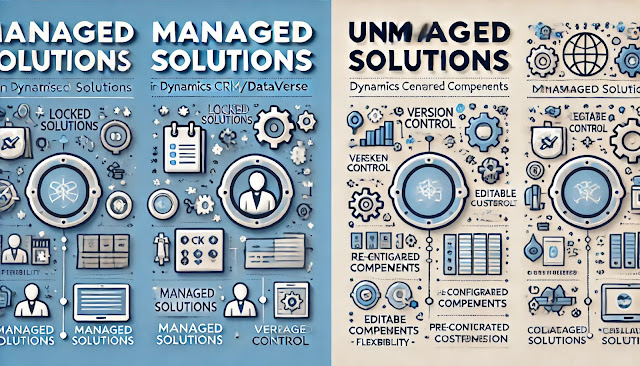
Exploring the Differences: Managed vs. Unmanaged Solutions in Dynamics CRM/Dataverse

Image
In Dynamics CRM/Dataverse, solutions are central to Application Lifecycle Management (ALM) , providing a structured way to manage, package, and distribute customizations across environments. Microsoft uses solutions to transfer apps and customizations by exporting them from one Dataverse environment and importing them into another.  Each solution is authored and maintained by a publisher and includes components like Power Apps (canvas and model-driven), flows, entities, forms, connectors, web resources, and configurations—excluding business data. Solutions streamline ALM practices within Microsoft Power Platform. In Dynamics CRM/Dataverse, there are two types of solutions: Managed and Unmanaged . When planning an implementation, it’s important to understand the advantages and disadvantages of each to make an informed decision. Let’s explore both types to determine the best approach for development and deployment. In Dynamics 365 CRM, a managed solution is a fully packaged solution ...

Effective Strategies for Debugging Plugins in Dynamics CRM

Image
In a recent interview, I was asked about debugging plugins in Dynamics CRM. The interviewer specifically wanted to know my approach to plugin debugging. In response, I mentioned using the Plugin Registration Tool profiler. However, I later realized there are multiple methods to debug plugins in Dynamics CRM/Dataverse, each essential for efficient troubleshooting. Debugging plays a crucial role in development, and having a solid understanding of various debugging approaches can help streamline issue resolution in Dynamics 365. Here, I'll explore different techniques for debugging plugin code. There are below options to use in the plugin in Dynamics CRM/Dataverse ITracingService : In Dynamics CRM plugin development, ITracingService is a service provided within the plugin's execution context that logs information for tracing and debugging. It allows developers to capture real-time. Plugin Profiler : A plugin profiler in Dynamics CRM (or Dataverse) is a debugging tool in the Plugi...

Plugin Registration Tool: Configuring Secure Configuration and Unsecure Configuration Settings

Image
The Plugin Registration Tool’s ability to configure Secure and Unsecure Configuration settings provides a powerful and flexible mechanism to manage plugin behavior and settings. Leveraging these configurations enhances security, maintainability, and adaptability of your Dynamics 365 CE plugins, making it easier to manage and deploy across various environments with different requirements. The Microsoft Dynamics 365 platform supports an optional plug-in constructor that can accept either one or two string parameters. By writing a constructor in this manner, we can pass any strings of information to the plug-in at runtime.  Secure Configuration vs. Unsecure Configuration Secure Configuration and Unsecure Configuration are ways to pass custom settings to plugin: Unsecure Configuration: This data is stored in plain text and can be accessed by any user who has access to the plugin registration tool. It is suitable for non-sensitive data that does not require confidentiality. Secure Conf...