Posts

Showing posts with the label Solution Checker

Solution Checker: Bridging the Gap Between Low-Code and Pro-Code Quality

Image
Solution Checker is a built-in quality assurance and analysis tool in Microsoft Power Platform that helps evaluate Dataverse solutions against Microsoft’s recommended best practices. It scans solution components such as plugins, JavaScript, Power Automate flows, apps, tables, and security roles to identify potential issues related to performance, security, reliability, and maintainability. By using rule-based and static code analysis , Solution Checker highlights risks early in the development lifecycle, helping teams fix problems before deployment. It is widely used by developers, architects, and release teams to improve code quality, reduce technical debt, prevent production issues, and ensure solutions are scalable, secure, and upgrade-ready across environments. Rule-based analysis checks “what rules you broke”, while static code analysis checks “what could go wrong in your code without running it”. What is Solution Checker? Solution Checker is a built-in quality and health check...

Extend Your Solutions: Custom API + Field Mapping in Dataverse

Image
Dataverse powers the heart of the Microsoft Power Platform, offering a rich relational data layer and a suite of tools for makers and developers. While low-code configurations can solve many business needs, there comes a point when complex business logic demands more. Enter Custom APIs—your way to encapsulate server-side logic in a secure, reusable, and solution-aware package. Combine this with Field Mapping—which ensures automatic data population between related tables—and you unlock a powerful pattern for building sophisticated enterprise apps. In this post, we’ll do a deep technical dive into: What Custom APIs and Field Mapping are Why they’re better together Real-world scenarios Best practices Pitfalls to avoid What is a Custom API? Custom APIs let you define your own operations in Dataverse, complete with input/output parameters and server-side logic. Unlike workflows or Power Automate flows, they’re built for high performance and enterprise ALM. Features of Custom APIs Entity-bou...

Field Mapping in Dataverse: Simplify Data Transfer Between Tables

Image
Field Mapping in Microsoft Dataverse is one of those features that rarely gets the spotlight—but it’s a game changer for building robust, user-friendly solutions in the Power Platform. Whether you’re a pro developer or a low-code maker, understanding and using Field Mapping properly can save hours of development time, simplify user experiences, and improve data consistency. In this blog, we’ll break down what Field Mapping is, how it works under the hood, its advantages and limitations, and real-world scenarios where it shines. What Is Field Mapping? In Microsoft Dataverse, Field Mapping is a feature of table relationships (1\:N or N:1) that lets you automatically copy data from a parent record to a new child record. When a user creates a new record from within the context of a related parent (like clicking + New Contact from an Account form), the system can pre-fill the child form with values from the parent record. This is done without a single line of code. How Does Field Mapping Wo...

Field Mapping vs Business Rules: When to Use What in Dataverse?

Image
Microsoft Dataverse (the backbone of the Power Platform) offers incredible flexibility for building business solutions. But for every Dynamics 365 or Power Apps maker, there’s often one confusing question: “When should I use Field Mapping, and when should I use Business Rules?” These two features may sound similar, but they serve very different purposes in customizing your Dataverse solutions. Let’s break them down with a technical deep dive, real-world scenarios, and best practices. What Are Field Mapping and Business Rules? Field Mapping: Auto-Populate Child Records What is it ? Field Mapping in Dataverse allows you to auto-fill fields in a child entity with values from the parent entity when creating a related record. Example: When creating a Contact from within an Account, you want the Address1 fields to copy over automatically. How It Works Go to Tables → Relationships in Dataverse. Select a relationship (1\:N or N:1). Click Mappings. Map fields between parent and child tables (mu...

Quick View Forms: The Secret Weapon in Dataverse UX

Image
In the world of Microsoft Dataverse and Dynamics 365, delivering seamless, user-friendly experiences is no longer optional—it’s essential. One often-overlooked feature that quietly transforms how users interact with data is the Quick View Form. Quick View Forms are like the Swiss Army knife of model-driven apps. They empower makers and architects to surface related data contextually, keeping users informed without overwhelming them. But why are they such a game changer? Let’s break it down. What Are Quick View Forms? A Quick View Form lets you embed a subset of fields from a related table (entity) directly into the main form of another table. Imagine this: When a user opens a Case, they instantly see key Account details—like Primary Contact, Credit Limit, and Account Status—without ever leaving the Case form. It’s read-only, lightweight, and perfect for displaying critical information from related records. Why Quick View Forms Are Game Changers How Quick View Forms Work (Technical Dee...

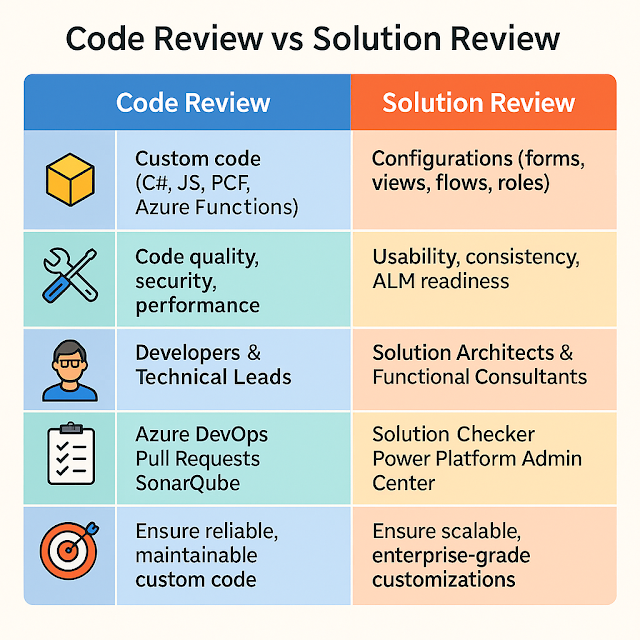
Code Review vs Solution Review: Why Both Matter in Power Platform

Image
In the Power Platform world, we often talk about code reviews for plugins, custom APIs, or PCF components. But what about the customizations—like forms, views, security roles, and workflows? These also need careful attention. That’s where Solution Reviews step in. In this blog, we’ll unpack both practices, show why they’re essential, and share how architects and developers can work together to keep your environments healthy. What’s the Difference? What Happens in a Code Review? A Code Review focuses on technical correctness and follows practices like: Verifying naming conventions and coding standards Checking for secure coding (e.g., parameterized queries, no hard-coded secrets) Assessing performance (e.g., avoid expensive queries in plugins) Reviewing error handling and logging Ensuring test coverage with unit tests Example: Reviewing a plugin that calculates discounts to ensure it doesn’t run synchronously on every save, causing performance hits. What Happens in a Solution Review? A ...