Posts

Showing posts with the label Best Practices

Extend Your Solutions: Custom API + Field Mapping in Dataverse

Image
Dataverse powers the heart of the Microsoft Power Platform, offering a rich relational data layer and a suite of tools for makers and developers. While low-code configurations can solve many business needs, there comes a point when complex business logic demands more. Enter Custom APIs—your way to encapsulate server-side logic in a secure, reusable, and solution-aware package. Combine this with Field Mapping—which ensures automatic data population between related tables—and you unlock a powerful pattern for building sophisticated enterprise apps. In this post, we’ll do a deep technical dive into: What Custom APIs and Field Mapping are Why they’re better together Real-world scenarios Best practices Pitfalls to avoid What is a Custom API? Custom APIs let you define your own operations in Dataverse, complete with input/output parameters and server-side logic. Unlike workflows or Power Automate flows, they’re built for high performance and enterprise ALM. Features of Custom APIs Entity-bou...

Field Mapping in Dataverse: Simplify Data Transfer Between Tables

Image
Field Mapping in Microsoft Dataverse is one of those features that rarely gets the spotlight—but it’s a game changer for building robust, user-friendly solutions in the Power Platform. Whether you’re a pro developer or a low-code maker, understanding and using Field Mapping properly can save hours of development time, simplify user experiences, and improve data consistency. In this blog, we’ll break down what Field Mapping is, how it works under the hood, its advantages and limitations, and real-world scenarios where it shines. What Is Field Mapping? In Microsoft Dataverse, Field Mapping is a feature of table relationships (1\:N or N:1) that lets you automatically copy data from a parent record to a new child record. When a user creates a new record from within the context of a related parent (like clicking + New Contact from an Account form), the system can pre-fill the child form with values from the parent record. This is done without a single line of code. How Does Field Mapping Wo...

Field Mapping vs Business Rules: When to Use What in Dataverse?

Image
Microsoft Dataverse (the backbone of the Power Platform) offers incredible flexibility for building business solutions. But for every Dynamics 365 or Power Apps maker, there’s often one confusing question: “When should I use Field Mapping, and when should I use Business Rules?” These two features may sound similar, but they serve very different purposes in customizing your Dataverse solutions. Let’s break them down with a technical deep dive, real-world scenarios, and best practices. What Are Field Mapping and Business Rules? Field Mapping: Auto-Populate Child Records What is it ? Field Mapping in Dataverse allows you to auto-fill fields in a child entity with values from the parent entity when creating a related record. Example: When creating a Contact from within an Account, you want the Address1 fields to copy over automatically. How It Works Go to Tables → Relationships in Dataverse. Select a relationship (1\:N or N:1). Click Mappings. Map fields between parent and child tables (mu...

Sales Collaboration: How Sales Teams Work in Dynamics 365 CE

Image
A Sales Team in Microsoft Dynamics 365 Sales represents a group of users who collaborate to manage and close sales opportunities efficiently. Instead of a single owner handling a customer or deal, multiple users can contribute — such as account managers, sales representatives, technical experts, and sales managers — each bringing unique expertise to the sales process. Technically, a sales team is built using Dynamics 365 team entities, which define user membership, roles, and access privileges. Depending on business needs, organizations can use Owner Teams (which can own records and have assigned security roles) or Access Teams (which allow dynamic sharing of specific records without transferring ownership). This approach promotes collaborative selling , improves visibility across complex deals, ensures data security through controlled access, and enables team-based reporting and forecasting to drive better sales performance and accountability. What Is a Sales Team in Dynamics 365 S...

Environment Variables vs Configuration Tables vs Hardcoding in Dynamics 365 Customer Engagement (CE)

Image
In Dynamics 365 Customer Engagement (CE) , managing configuration values effectively is key to building scalable and maintainable solutions. Environment Variables are best suited for storing environment-specific data such as API URLs, keys, or connection strings, allowing smooth deployment across development, testing, and production environments without code changes. Configuration Tables , on the other hand, are ideal for storing frequently changing business settings—such as thresholds, flags, or parameters—that can be modified directly within the application by administrators or business users. In contrast, hardcoding values directly into plugins or scripts should be avoided except for fixed constants, as it reduces flexibility and makes maintenance difficult. By combining Environment Variables for system-level settings and Configuration Tables for business logic, developers and architects can create cleaner, more secure, and easily adaptable Dynamics 365 solutions. 1. Environment Va...

Quick View Forms: The Secret Weapon in Dataverse UX

Image
In the world of Microsoft Dataverse and Dynamics 365, delivering seamless, user-friendly experiences is no longer optional—it’s essential. One often-overlooked feature that quietly transforms how users interact with data is the Quick View Form. Quick View Forms are like the Swiss Army knife of model-driven apps. They empower makers and architects to surface related data contextually, keeping users informed without overwhelming them. But why are they such a game changer? Let’s break it down. What Are Quick View Forms? A Quick View Form lets you embed a subset of fields from a related table (entity) directly into the main form of another table. Imagine this: When a user opens a Case, they instantly see key Account details—like Primary Contact, Credit Limit, and Account Status—without ever leaving the Case form. It’s read-only, lightweight, and perfect for displaying critical information from related records. Why Quick View Forms Are Game Changers How Quick View Forms Work (Technical Dee...

From Debugging to Optimization: Unlock the Power of Plugin Trace Logs

Image
In the world of Dynamics 365 CRM and the Power Platform, plugins are powerful tools that allow you to execute custom business logic during system events. But with great power comes great responsibility — especially when things go wrong. This is where Plugin Trace Logs come in. Whether you're debugging an issue or optimizing performance, Plugin Trace Logs provide deep insights into your plugin’s behavior, execution path, and errors. Let’s dive into how you can harness this often-overlooked feature to your advantage. What Are Plugin Trace Logs? Plugin Trace Logs are diagnostic tools built into Dynamics 365 that allow developers and architects to trace what a plugin is doing when it runs — including: Input and output parameters Execution pipeline stages Exception messages Performance metrics Custom trace messages (via `TracingService`) These logs help isolate issues, validate logic, and fine-tune execution time. How to Enable Plugin Trace Logs To start using Plugin Trace Logs, you’ll ...

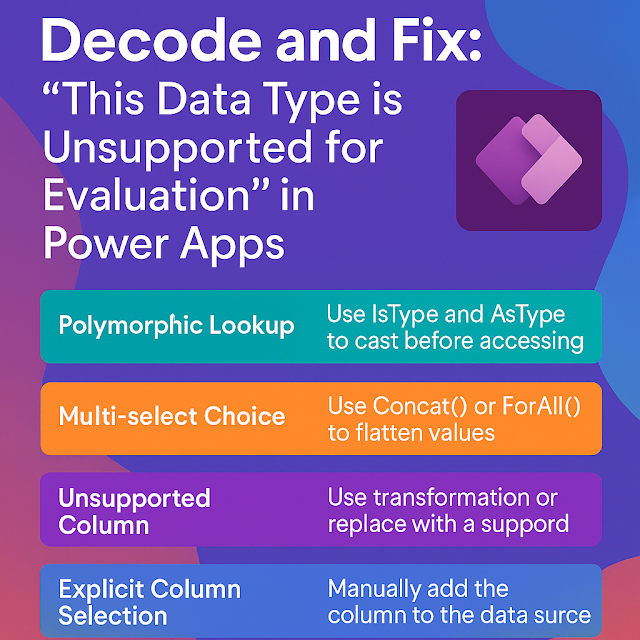
Decode and Fix: “This Data Type is Unsupported for Evaluation” in Power Apps

Image
 One common frustration when building Canvas Apps over Dataverse is encountering this cryptic error:  “This data type is unsupported for evaluation” This message typically appears when Power Apps cannot process or render a specific Dataverse column type within a control or formula. While it may seem vague, it’s usually tied to specific patterns involving complex column types or runtime data structure mismatches. In this blog, we'll explore common causes, scenarios, and practical fixes from both a developer and architectural standpoint. Root Causes of the Error 1. Polymorphic Lookups Dataverse supports polymorphic relationships (e.g., `Owner`, `Customer`, `Regarding`) that can point to multiple entity types. These lookups can't be directly evaluated in Power Apps unless you cast the reference explicitly. Use: If(     IsType(ThisItem.Customer, Account),     AsType(ThisItem.Customer, Account).Name,     AsType(ThisItem.Customer, Contact).FullName ) 2....

Why Environment Management Matters for Architects and Developers in Power Platform

Image
Environment Management isn’t just an admin feature—it’s a strategic enabler for solution architects and developers building on Power Platform. Here's why it plays a vital role for both roles: For Solution Architects 1. Design with Governance in Mind Architects can align app and automation design with environment strategies like Dev/Test/Prod separation, data boundary policies, and compliance zones—ensuring scalability, security, and regulatory alignment from day one. 2. Environment Strategy as Architecture Backbone Environment Management allows architects to define:  Region-specific environments for data residency  Dedicated environments for critical workloads  ALM pipelines with clear environment stages  This supports a robust and modular enterprise architecture. 3. Visibility into the Platform Ecosystem With full visibility and telemetry, architects can understand: How environments are used Where capacity is strained Which apps or flows might need restructuring Thi...

Introducing Prompt Columns in Dataverse: The Power of Generative AI Inside Your Tables

Image
 Imagine having your data not just stored—but intelligently understood, categorized, and responded to—all inside Dataverse. That’s exactly what Prompt Columns bring to the Power Platform: a seamless fusion of structured data and Generative AI. In this post, we’ll dive into what Prompt Columns are, how they work, and how you can use them to supercharge your apps with AI, all without needing to be a data scientist. What Are Prompt Columns in Dataverse? Prompt columns are a brand-new column type in Dataverse that allow you to generate values using AI prompts. Unlike traditional fields that rely on user entry or formulas, prompt columns use AI models to populate values based on your instructions. Key Capabilities: Start with a simple prompt (e.g., “Classify this feedback as positive, negative, or neutral”). Use Copilot to help draft your instructions. Choose from basic to premium AI models or bring in custom Azure AI models. Provide context (i.e., “knowledge”) using other fields in th...

Dataverse for Architects: Designing with Alternate Keys in Mind

Image
In Microsoft Dataverse, data integrity and uniqueness are critical for building scalable, enterprise-grade apps. While Dataverse ensures every row has a system-generated GUID as its primary key, real-world business scenarios often require natural identifiers like Customer Numbers or Email Addresses to enforce uniqueness. This is where Keys in Dataverse—both primary and alternate—become essential. In this guide, we’ll deep dive into:  What keys are in Dataverse  Technical details for developers  Strategic insights for architects  Real-world use cases  Limitations and best practices What Are Keys in Dataverse? A key in Dataverse defines a column (or set of columns) that enforces uniqueness in a table. This means no two rows can have the same value for the key column(s). There are two types of keys in Dataverse: Primary Key (System-Managed) Every Dataverse table automatically includes a GUID primary key (e.g., `contactid`, `accountid`).  Assigned automatically...

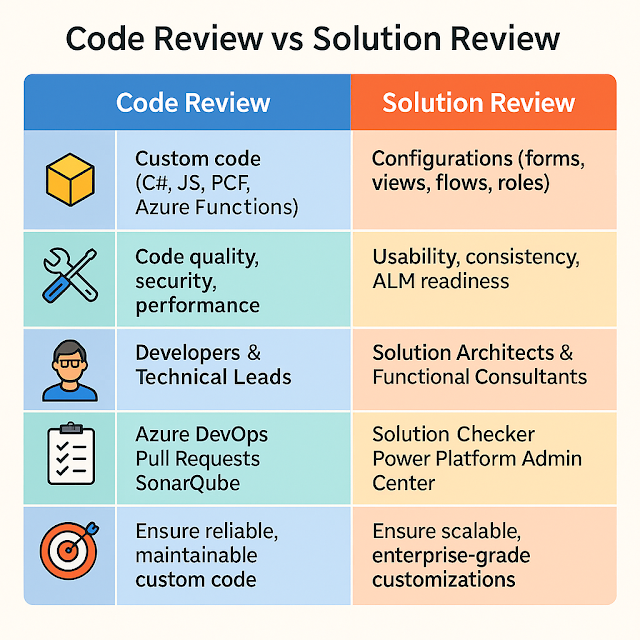
Code Review vs Solution Review: Why Both Matter in Power Platform

Image
In the Power Platform world, we often talk about code reviews for plugins, custom APIs, or PCF components. But what about the customizations—like forms, views, security roles, and workflows? These also need careful attention. That’s where Solution Reviews step in. In this blog, we’ll unpack both practices, show why they’re essential, and share how architects and developers can work together to keep your environments healthy. What’s the Difference? What Happens in a Code Review? A Code Review focuses on technical correctness and follows practices like: Verifying naming conventions and coding standards Checking for secure coding (e.g., parameterized queries, no hard-coded secrets) Assessing performance (e.g., avoid expensive queries in plugins) Reviewing error handling and logging Ensuring test coverage with unit tests Example: Reviewing a plugin that calculates discounts to ensure it doesn’t run synchronously on every save, causing performance hits. What Happens in a Solution Review? A ...